
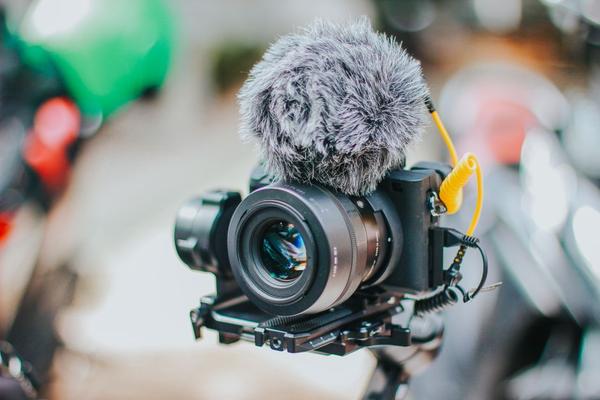
A camera that promises beautiful 4K footage can still be a poor vlogging partner. If focus drifts while you talk, your face disappears behind an on-screen menu, or the lens feels too tight at arm’s length, the impressive specification sheet stops mattering. The best vlogging camera features solve problems you encounter while recording yourself, not just while filming someone else.
Before buying, picture your usual setup: sitting at a desk, walking through a city, filming products, or switching between horizontal YouTube videos and vertical clips. That routine should decide which features deserve your money.
Start With Video Autofocus You Can Trust
Reliable video autofocus is one of the biggest differences between effortless footage and repeated takes. Look for face and eye detection, subject tracking, and a touch-to-focus option. A good system should follow you when you lean forward, turn sideways, or briefly leave the frame, then regain focus smoothly when you return.
Check real video tests rather than relying on a claim of “fast autofocus.” Some cameras focus quickly for photographs but visibly hunt during recording. If you frequently hold a product toward the lens, look for a focus mode that shifts from your face to the object without constant menu changes. Adjustable focus-transition speed is useful when you want a gentler, less distracting change.
Make Sure the Lens Is Wide Enough
A wide-angle view matters more than many buyers expect. A flip screen camera with a narrow lens may show only your face when held at arm’s length, leaving little space for your surroundings. For walking vlogs, compare sample footage at the widest setting with stabilization turned on, because some electronic stabilization modes crop the image.
On interchangeable-lens cameras, the kit lens may be sufficient indoors but awkward for handheld selfies. Check the actual field of view at your chosen resolution and frame rate. A compact camera with a genuinely wide lens can be more convenient than a larger body that requires another lens purchase.
Understand the Types of Stabilization
Stabilization is essential if you plan to film while moving, but the labels are not interchangeable. Optical lens stabilization and in-body image stabilization compensate for physical movement. Electronic stabilization uses processing and may reduce the visible frame area. Some cameras combine methods in an active mode.
For seated talking-head videos, almost any stable tripod is more useful than aggressive electronic correction. For travel footage, test how the camera handles footsteps, turns, and panning. Electronic modes can smooth movement but may introduce cropping or distortion. If the view becomes too tight after stabilization, you may need a wider lens or a small handheld grip.
Choose a Screen That Works From in Front of the Camera
A fully articulating touchscreen lets you confirm framing and exposure without walking behind the camera. Side-hinged screens can be particularly practical because they remain visible when accessories occupy the hot shoe, although cables may occasionally get in the way. Look for clear recording indicators, touch tracking, and a screen bright enough for outdoor use.
Do Not Compromise on Audio
Viewers will tolerate slightly imperfect footage more readily than muffled dialogue. A camera mic input, usually a 3.5 mm socket, lets you attach a compact directional microphone or a compatible wireless receiver. Check whether the camera also provides a headphone output, visible sound meters, and manual recording levels.
Read Video Resolution and Frame-Rate Specs Carefully
Most shoppers will be well served by clean 4K recording, but “4K” alone reveals little about video quality. Look at whether the camera crops at 4K, whether autofocus and stabilization still work in each mode, and how much detail is retained during movement. For conversational videos, 24, 25, or 30 frames per second are common choices; 50 or 60 fps can be helpful for smoother action or modest slow motion.
Check Battery Life, Power Options, and Heat Limits
Manufacturer battery ratings do not always reflect continuous video recording with a bright screen, autofocus, and stabilization running. Check real-world runtime in your preferred video mode, and consider the cost of a spare battery. USB-C charging is helpful, but confirm whether the camera can actually record while receiving compatible external power; charging support does not automatically mean continuous power support.
Heat is another practical limitation. Long 4K sessions, warm locations, and demanding frame rates can raise internal temperatures, and some cameras stop recording to protect themselves. For interviews, lessons, or lengthy desk videos, read the operating manual for recording and temperature limits, then seek sustained-recording tests. A camera that lasts through a full take is more valuable than one with a slightly sharper image that repeatedly interrupts it.
Look for Vertical Video and Fast Workflow Tools
If you publish Shorts, Reels, or TikTok videos, check for vertical recording metadata, portrait framing guides, and an interface that rotates appropriately. Some cameras offer quick transfer to a phone, USB webcam functionality, or creator-friendly shooting presets. These conveniences can save time, but confirm which require a companion app or supported connection.
Match the Camera to the Videos You Actually Make
For Walk-and-Talk Travel Videos
Put wide framing, lightweight handling, stabilization, effective wind protection, and battery life first. Record a sample while walking, not merely standing still in a shop.
For Desk Tutorials and Product Demonstrations
Prioritize dependable face-to-object autofocus, a usable mic input, external power, and sustained recording. Try this specific test: frame yourself at your desk, hold a small product close to the lens, then pull it away. Review whether focus follows the product and returns to your eyes without distracting pulsing.
For Social-First Creators
A convenient flip screen, vertical framing tools, quick phone transfer, and simple controls may outweigh elaborate cinema settings. Spend enough time holding the camera to judge its grip and balance.
Frequently Asked Questions
Is 4K necessary for vlogging?
No. Good 1080p footage can work well, particularly for simple talking-head content. However, 4K gives you more room to crop or reframe for different platforms, provided your editing device handles the files.
Is a microphone input worth paying extra for?
Usually, yes, especially when recording speech in noisy rooms or outdoors. It gives you more options than relying only on the built-in microphone, although placement and recording levels remain important.
Do I need in-body stabilization?
Not necessarily. Tripod-based videos seldom benefit from it. For handheld filming, compare actual results from optical, in-body, and electronic systems, including any extra crop.
Should I buy a compact camera or a mirrorless camera?
Choose a compact model for portability and straightforward operation. Consider mirrorless if you want interchangeable lenses and greater room to expand your setup. In both cases, test self-recording features before committing.
Make the Final Choice Around Your Recording Routine
The smartest purchase is not automatically the camera with the largest sensor or longest feature list. Find the model that maintains focus on you, frames you comfortably, captures clear speech, and records reliably for the length of your typical session. Once those essentials are covered, extras such as higher frame rates and advanced color modes become useful refinements rather than expensive distractions. For the rest of the setup, explore camera sensor sizes, external microphones for video, and beginner video lighting.