
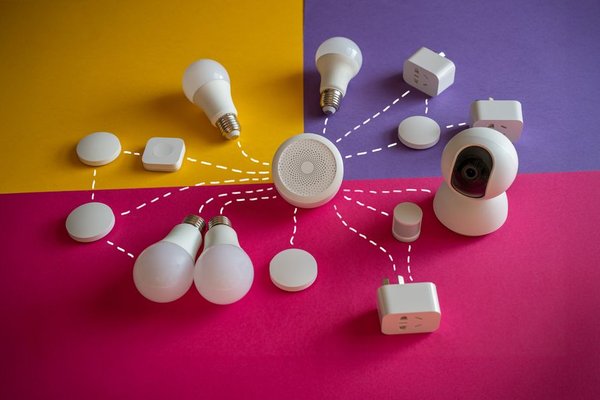
Choosing a smart home hub is less about finding the fanciest box and more about deciding which devices will work together for years. A hub that handles your current bulbs but cannot connect the sensors or locks you buy next year can turn a convenient setup into separate apps. The right choice starts with compatibility, not a feature-packed product page.
This smart home hub guide explains how to match a controller to your devices, understand wireless protocols, and judge automation needs before spending money.
Start With Your Devices, Not the Hub
Make an inventory of what you already own. Record each device’s brand, model, connection type, and app. Include products you plan to buy, especially locks, thermostats, motion sensors, and switches. These can be harder to replace than a plug-in bulb.
Check the hub manufacturer’s compatibility list for each exact model. A brand name is not enough: one generation may work through Matter, while an earlier model requires a proprietary bridge. Confirm regional availability, because integrations and device variants can differ by country.
Before adding another gadget, check whether it can join your chosen system.
Understand What Each Wireless Standard Does
Wi-Fi and Bluetooth
Many smart plugs, cameras, and bulbs connect directly to home Wi-Fi. They may not need a separate radio hub, but that does not guarantee they can participate in your preferred automations. Bluetooth accessories typically have shorter range and may need a nearby controller for remote access.
Zigbee and Z-Wave
These low-power mesh technologies are common in sensors, switches, and locks. They generally require a compatible hub with the appropriate radio. Plug-powered mesh devices can often relay signals, improving coverage. A hub supporting Zigbee is not automatically a Z-Wave hub, and protocol support does not ensure every feature works.
Matter and Thread
Matter is a smart home interoperability standard, not another wireless radio. Matter devices communicate over Wi-Fi, Ethernet, or Thread. Thread is a low-power mesh network that needs a Thread border router to connect with your home network. A Matter controller manages devices; a Thread border router carries network traffic. Some products perform both jobs, but these are distinct roles.
A Thread logo alone does not prove Matter support. Look for the Matter designation and verify supported functions. A useful companion read is Matter versus Thread explained, particularly if battery-powered sensors are on your shopping list.
Check Smart Hub Compatibility at the Feature Level
Compatibility should mean more than seeing a device appear in an app. Can the hub adjust colour temperature, report a lock’s battery level, or trigger a rule from a motion sensor? Some bridges expose only a subset of features in the manufacturer’s own app.
Make three checks: whether the exact model is listed, whether your desired function is supported, and whether it works locally or requires the internet. Ask how firmware updates are delivered. The original brand app may remain necessary for updates or advanced settings.
Matter can let supported devices be shared across ecosystems, but does not make every accessory universally compatible or give every platform identical features.
Choose an Ecosystem You’ll Actually Use
Apple Home is an appealing starting point for households using iPhones and HomePods. A compatible HomePod or Apple TV can serve as a home hub; Thread-based Matter accessories also need Thread border routing. Check hardware generations rather than assuming every Apple TV provides it.
Google Home and Amazon Alexa can suit households wanting voice controls, speakers, and straightforward routines. Confirm that your particular speaker or display supports the controller and Thread functions your accessories require.
SmartThings offers another route for mixed-brand devices, with appropriate hubs supporting Zigbee and Z-Wave. Capabilities vary by model. Home Assistant appeals to people wanting detailed automations and broad integrations, but its setup and maintenance demand more attention. A practical home automation hub fits your willingness to troubleshoot.
Decide How Much Local Control Matters
Imagine your internet connection goes down at midnight. Should hallway motion still turn on a light? If yes, examine the complete path: the sensor, hub, rule engine, and light must communicate without relying on the cloud. A product described as locally controlled may still use online services for notifications, voice requests, or certain integrations.
Ask which routines survive an outage and what happens if support ends. Review account requirements, update policies, and backup options. For a deeper look, local versus cloud smart home control makes a useful companion topic.
Test a Real Automation Before Committing
Suppose you want a hallway light to illuminate at 20% brightness after sunset when motion is detected, then switch off after two minutes of inactivity. This small test reveals more than a feature list. Your hub must receive the motion event, know the sunset condition, control brightness, and manage the delay.
Try that routine with one sensor and bulb before equipping the hallway. Briefly disconnect the internet, if safe, and see what still works. Check whether household members can override it with a physical switch. This trial exposes missing features and awkward app behaviour early.
Budget for the Entire Setup
Compare the hub’s price with any additional radio adapters, proprietary bridges, Thread border routers, or subscriptions. Check whether Ethernet is available and whether radio coverage reaches distant rooms. A cheap hub can become costly if every accessory needs another bridge.
Consider setup time and maintenance. Simple routines may justify an easy platform; complex cross-brand rules may justify a more configurable one. If you are choosing your first accessories, a smart home starter checklist can help prioritise purchases.
Frequently Asked Questions
Do I need a smart home hub if I already have Wi-Fi devices?
Not always. Many Wi-Fi devices operate from their own apps. A hub becomes useful for centralised control, coordinated automations, remote access, or support for Zigbee and Z-Wave.
Is a Matter controller the same as a Thread border router?
No. The controller manages Matter accessories; the border router connects a Thread network to your home network. Some hardware includes both functions, while other setups need separate components.
Can one smart home hub control every brand?
No hub guarantees universal support. Confirm individual models, protocols, regions, and features. Even Matter-compatible products may expose different capabilities across platforms.
Should I choose local control over cloud features?
Prioritise local operation for essential routines you want working during an outage, then decide which cloud conveniences are worthwhile. Many households benefit from a mixture.
Conclusion
Learning how to choose a smart home hub means thinking one purchase ahead. Build your device list, identify the protocols you need, confirm feature support, and test one meaningful automation. The best hub is not necessarily the one with the longest compatibility claim; it is the one that makes present devices cooperate and leaves room for what comes next.